Short answer: no single chroma key can key a transparent object. A key measures the composite, so one 30% white veil sat 22.31% from the green over the backdrop but 56.25% over skin. At 22%/3% the same veil got alpha 26 in the gap and 255 across the face: 28,085 of 36,400 veil pixels were erased, 8,315 turned solid. Recover the veil with a clean-plate pair.
What the key actually measures
A straight-alpha composite is C = αF + (1−α)G, where G is the backdrop, F is the transparent object's colour and α is its coverage. A chroma key samples G, then measures the distance from the pixel colour C to G. It never sees α or F separately. With one equation and two unknowns, the best it can do is guess that a pixel farther from the green is more opaque.
That guess is fine for an opaque subject: α is 0 or 1, and the key is only deciding which side of a threshold a pixel is on. It is the wrong model for a veil. The veil has a real α of, say, 0.30, and its colour is a blend that moves along the line from G to F as the coverage changes. The key sees a point on that line and assigns whatever alpha the distance suggests, which is not the veil's alpha. The table below is the whole problem in numbers, using the exact formula on the browser keyer: distance divided by 441.6729559, alpha 0 at or below tolerance, a linear ramp across softness, 255 above.
| Veil colour | 10% (true 26) | 20% (true 51) | 30% (true 77) | 40% (true 102) | 50% (true 128) |
|---|---|---|---|---|---|
| White #ffffff | 7.51% / 0 | 14.85% / 0 | 22.31% / 26 | 29.64% / 255 | 37.29% / 255 |
| Grey #808080 | 3.43% / 0 | 6.96% / 0 | 10.20% / 0 | 13.73% / 0 | 17.09% / 0 |
| Black #000000 | 4.30% / 0 | 8.45% / 0 | 12.75% / 64 | 17.12% / 0 | 21.20% / 0 |
Each cell is distance / alpha. The same 30% coverage produces 22.31% for a white veil, 10.20% for a grey one and 12.75% for a black one, because the veil's own colour changes how far the blend sits from the green. A darker veil is not “less transparent” to the key; it is closer to the backdrop and disappears sooner.
The same veil over four backgrounds
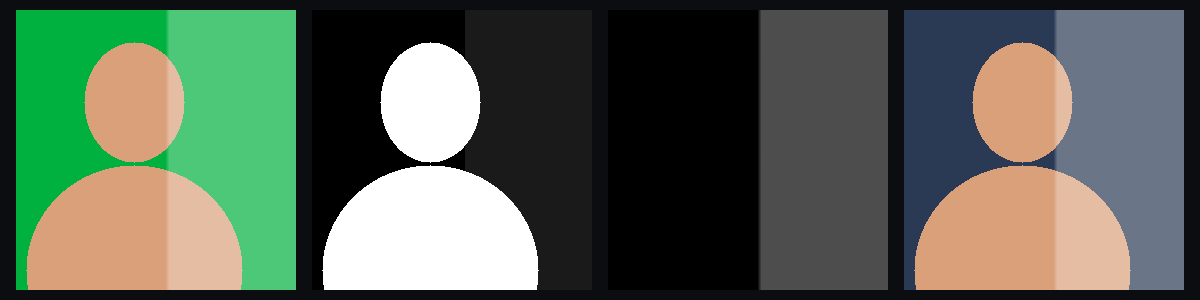
The distance also depends on what is behind the veil, and that is the part a single key cannot separate. Here the veil is the same 30% white fabric in every row; only the background changes. The correct matte for the veil layer is alpha 77 in all four cases.
| Behind the veil | Composite | Distance | 12% / 3% | 16% / 3% | 21.4% / 3% | 22% / 3% | 28% / 3% |
|---|---|---|---|---|---|---|---|
| Lit backdrop #00b140 | #4dc879 | 22.31% | 255 | 255 | 77 | 26 | 0 |
| 60% shadow #00471a | #4d7e5f | 22.06% | 255 | 255 | 56 | 5 | 0 |
| Black hair #1b1b1b | #5f5f5f | 29.27% | 255 | 255 | 255 | 255 | 108 |
| Skin midtone #d9a07a | #e4bda2 | 56.25% | 255 | 255 | 255 | 255 | 255 |
At the site default of 22% tolerance and 3% softness, the same 30% veil is alpha 26 over the lit green, alpha 5 over a shadow, and alpha 255 over black hair and skin. The matte is not describing the veil. It is describing the background behind the veil. Over the backdrop the veil is almost erased; over the face it becomes a solid sheet. That is why a keyed veil usually looks like a cutout: the part in the gap disappears, while the part across the person stays.
The lit green and the shadow green are only 0.25 percentage points apart (22.31% against 22.06%), yet the alpha moves from 26 to 5. Both pixels sit inside the 3% softness ramp, where a small distance change turns into a large alpha change. On an opaque edge that ramp is useful. On a transparent object it means the matte is unstable: a small exposure shift or a fold changes the veil's alpha by tens of levels.
Why edge softness cannot fix it
If the veil needs alpha 77, the obvious move is to widen softness until the key outputs 77. That works on the veil over the backdrop, and then fails everywhere else, because softness is a global ramp. The table below solves for the softness that gives the 30% veil alpha 77 at three tolerances, then reads the same key on the materials that must stay opaque.
| Tolerance | Softness | Veil over green | Backdrop | Green shirt | Navy denim | Black hair | Skin | White shirt |
|---|---|---|---|---|---|---|---|---|
| 0% | 73.88% | 77 | 0 | 55 | 108 | 123 | 176 | 226 |
| 12% | 34.14% | 77 | 0 | 29 | 145 | 176 | 255 | 255 |
| 21.4% | 3.01% | 77 | 0 | 0 | 255 | 255 | 255 | 255 |
None of the three rows is usable. The first two turn the subject into a ghost: at 0% tolerance and 73.88% softness, skin is alpha 176, black hair 123 and navy 108, so the person is translucent everywhere. The third row keeps the opaque materials but deletes a green shirt completely, and it still gives alpha 255 for the veil over skin — the issue in the previous table. A single slider cannot make the matte depend on whether the pixel is a veil or a background, because that information is not in the distance.
This is different from the usual “raise tolerance until the background goes” advice. That advice assumes the subject is opaque, so any partial alpha is an edge error. Here partial alpha is the subject. A key tuned to delete the backdrop must give the veil a low alpha, and a key tuned to preserve the veil must leave the backdrop partly visible. There is no middle value that satisfies both.
What works: a clean-plate pair
The information the key is missing is what the scene looks like without the veil. If the camera and the subject are locked, shoot that frame too. Then each pixel gives one equation with one unknown:
α = (Cwith − Cplate) / (F − Cplate)
Cplate is the same pixel without the veil, Cwith is the pixel with it, and F is the veil's own colour. For a white veil, F is 255 in every channel. The subtraction removes the background, so the result is the veil's coverage rather than a guess based on distance from green. Solve per pixel, and use the channel where |F − Cplate| is largest; that is the channel least damaged by 8-bit rounding. Clamp the result to 0–1.
| True alpha | Over green | Over black hair | Over skin | Over white shirt |
|---|---|---|---|---|
| 26 (10%) | 26 | 26 | 25 | 31 |
| 51 (20%) | 51 | 51 | 52 | 51 |
| 77 (30%) | 77 | 76 | 77 | 82 |
| 102 (40%) | 102 | 102 | 102 | 102 |
| 128 (50%) | 128 | 128 | 128 | 133 |
Measured 2026-11-14 with the same 8-bit sRGB values used by the keyer. On the green, black-hair and skin plates the largest error is 1 level. On the white shirt the denominator is small because the plate is already near 255, so the same rounding costs up to 5.5 levels. That is a real limit, not a bug: a white veil over a white shirt is close to invisible to any per-pixel solve. Use a tinted veil, a different channel, or roto for that area.
The steps are short, but every one matters:
- Lock the camera, focus, aperture, shutter, ISO and white balance. The two frames must match pixel for pixel.
- Shoot the clean plate first: the same subject, same pose, same lighting, no veil.
- Shoot the frame with the veil. Do not move the subject between frames.
- Solve the formula per pixel in an editor, a compositor or a short script. Use the channel with the largest
|F − Cplate|. - Inspect the recovered alpha on mid-grey, white and black. A 30% veil should read 77 on all three; if it changes with the background, the plate is not aligned.
- Composite the veil as a separate layer over the original plate. Do not key the with-veil frame again.
For a veil alone on a table, where there is no subject behind it, the black/white pair is simpler and does not need the veil's colour. Shoot the same veil over pure black and pure white: Cblack = αF, Cwhite = αF + (1−α)255, so α = 1 − (Cwhite − Cblack) / 255. The difference is independent of F, which makes it work for a grey or coloured veil too. A true 30% veil gives 77 over black and 255 over white; the difference is 178, and 1 − 178/255 = 0.302, or alpha 77.
Glass, smoke and hair are not the same problem
Glass adds refraction to the same partial-coverage problem. The clean-plate formula still recovers coverage, but the colour behind the glass is displaced, so a plate without the glass does not match what the glass shows. You can solve the alpha and then warp the plate, or roto the glass and composite a separate reflection pass. A single chroma key cannot do either.
Smoke is a moving, thin volume with no fixed F and no usable clean plate. The community question that started with smoke on black is the same trap in a different colour: a colour key leaves a hard, dirty edge because the smoke's coverage varies continuously. Shoot smoke on black and use a luminance key or screen/add, or roto it. Do not expect a green-screen key to recover a volume.
Hair is opaque, but a thin strand covers only part of a pixel, so it has a real partial alpha too. The difference is that hair moves and is thin enough that a clean plate is hard to hold; the practical fix there is a softer key and temporal stabilisation, not a two-frame solve. The measured hair case is on green screen remover and hair flicker.
This page is about the object being transparent. It is not about green light bouncing onto an opaque surface; that is spill, and it has a different fix. If the edge is green but the surface is solid, start with green screen remover spill instead.
What the browser keyer can and cannot do here
The keyer on this site reads one image and one key colour. It has no second file input and no way to subtract a clean plate, so it cannot recover a veil matte. It is still useful as a diagnostic: load the with-veil frame, click the green, set 22% tolerance and 3% softness, and look at the veil where it crosses the gap and where it crosses the face. The gap goes transparent; the face keeps a solid band. That is the failure this page measures, visible in one frame.
Use the keyer to choose the backdrop sample and to confirm that the backdrop itself is uniform, then export the frame and do the clean-plate solve in an editor or compositor. The tool caps the working image at 1400 px on the long edge and does not read video. If the deliverable is a clip, the same limit applies: export frames, solve the veil on a locked-off shot, or roto it. The per-frame video path is on green screen remover for video.
If you have only the with-veil frame and no clean plate, no keyer can recover the veil. The information is not in the pixels: a 30% white veil over green and a 52% darker green backdrop can land at the same distance from the key, and the key has no way to choose between them. At that point the honest options are a reshoot with a plate, a roto, or a deliberate design that does not need the veil to be transparent.
Check before you shoot
- Is it actually transparent? Move a hand behind it. If the colour changes with the background, it is partial coverage, not green spill.
- Can you lock the camera and shoot a clean plate? If the answer is no, budget for roto before you shoot, not after.
- Does the veil differ from what is behind it? White on white is the worst case; a tinted sheer fabric or a channel with a large difference solves it.
- Is the veil moving? A single clean plate will not match a moving veil. A locked-off shot or a per-frame plate is required.
- Are there folds? Folds change the coverage pixel by pixel. The solve gives that variation; a single global 30% value does not.
- Check the alpha on grey, white and black. A correct 30% veil reads 77 on all three. If it reads differently, the plate or the exposure moved.
- Do not key the with-veil frame twice. Keying the recovered composite re-introduces the same background dependence.
Green screen remover transparent objects FAQ
Can a green screen remover key out a wedding veil?
Not with one key. A 30% white veil measured 22.31% from the green over the backdrop but 56.25% over skin; at the default 22%/3% the same veil got alpha 26 in the gap and 255 across the face. The key is measuring what is behind the veil, not the veil. Shoot a clean plate without the veil, camera locked, and solve α = (Cwith − Cplate) / (F − Cplate). On the tested green, hair and skin plates the recovered alpha was within 1 level of the true 30%; a white veil over a white shirt was off by up to 5.5 levels.
Why does the veil disappear over the background but stay solid over the face?
Because the key sees the composite. Over the green backdrop the veil's blend is close to the key colour, so it falls inside the tolerance and becomes transparent. Over skin the same veil is 56.25% away, so it becomes fully opaque. In the 280×280 test scene, 28,085 of 36,400 veil pixels were keyed below alpha 64 and 8,315 above 191; none of them kept the true 77. The matte followed the background, not the fabric.
Can I just lower the tolerance until the veil comes back?
It comes back as the wrong alpha. At 12%/3% the 30% veil is 255, a solid white sheet; at 22%/3% it is 26 over the backdrop, close to gone. The setting that gives 77 over the backdrop is about 21.4%/3%, but at that setting a green shirt is deleted and the veil over skin is still 255. Widening softness to get 77 at 12% tolerance needs 34.14%, which drops black hair to 176 and navy denim to 145. There is no global setting that gives 77 everywhere and keeps the opaque materials opaque.
What is a clean plate, and can I shoot one on a phone?
A clean plate is the same frame without the transparent object: same camera position, same lens, same focus, same exposure, same white balance, same subject pose. On a phone, lock focus and exposure, put the phone on a tripod, shoot the scene without the veil, then shoot it with the veil and do not move anything. The solve is per pixel, so the two images must align exactly. Handheld frames will not align well enough for a thin veil, even if the subject stands still.
Can I do this for video?
Only with a locked-off camera and a clean plate that still matches. If the veil moves, a single plate will not match the veil's position, and the difference will contain both the veil and the mismatch. Options are a per-frame plate (usually impossible), a difference matte with a static background, or rotoscoping. The browser keyer does not read video at all; export frames and solve them, or use a compositor. For the general video path, see green screen remover for video.
Does a higher-resolution image make the veil easier to key?
No. The ambiguity is in the colour of each pixel, not in the number of pixels. A 30% veil over green and a darker green backdrop can sit at the same distance from the key at any resolution. More pixels sample the same two unknowns more finely; they do not add the missing clean plate. The 8-bit rounding in the solve is the real precision limit: 1 level on the green, hair and skin plates, 5.5 levels on white-on-white.
What about a glass pane or a glass bottle?
Glass has the same partial coverage plus refraction. The clean-plate formula recovers how much of the pixel the glass covers, but the colour behind it is bent, so the plate without the glass does not show the same background. You can solve the alpha and warp the plate, or roto the glass and add a separate reflection pass. A single chroma key cannot do either. Keep the glass edge out of the green where possible, and shoot a plate with the glass removed if the camera is locked.
Next step
Start with the browser green screen remover on one frame to see the veil fail in the matte, then take the clean-plate pair to an editor or compositor. For the alpha check after a key, use the edge checker; for an opaque subject with green bounce, use the spill tool.