Short answer: a crease survives because it is farther from the key than the edge you are protecting. A 60% fold sits 25.50% from #00b140 and stays opaque at 22%/3%, while a half-covered hair pixel sits 17.73% and is deleted. A 40% crease matches a 48.3%-covered hair edge. Iron or tension the fabric; a 2 px blur clears the crease but adds a green fringe.
One fold, two colours moving in opposite directions
A wrinkle has two faces. The side turned away from the light is a self-shadow: the same green, multiplied down. The side turned into the light is a sheen: the same green plus white. Both are narrow, both are part of the backdrop, and both have to disappear before you composite. They do not behave the same way, because the keyer measures a straight-line distance in RGB and the two changes travel in different directions.
The slopes below are not guesses. The distance is sqrt(dr²+dg²+db²)/441.6729559, the same formula in the browser keyer. From #00b140, black is 42.61% away and white is 74.27% away, so a unit of darkening moves a pixel 42.61% of the scale while a unit of white sheen moves it 74.27% — 1.743× as fast.
| Darkened by | Colour | Distance | 8% / 3% | 12% / 8% | 22% / 3% | 28% / 3% |
|---|---|---|---|---|---|---|
| 10% | #009f3a | 4.30% | 0 | 0 | 0 | 0 |
| 20% | #008e33 | 8.45% | 39 | 0 | 0 | 0 |
| 30% | #007c2d | 12.75% | 255 | 24 | 0 | 0 |
| 40% | #006a26 | 17.12% | 255 | 163 | 0 | 0 |
| 50% | #005920 | 21.20% | 255 | 255 | 0 | 0 |
| 60% | #00471a | 25.50% | 255 | 255 | 255 | 0 |
| 70% | #003513 | 29.87% | 255 | 255 | 255 | 159 |
| 80% | #00230d | 34.16% | 255 | 255 | 255 | 255 |
| White added | Colour | Distance | 12% / 8% | 22% / 3% | 28% / 3% |
|---|---|---|---|---|---|
| 10% | #1ab953 | 7.51% | 0 | 0 | 0 |
| 20% | #33c166 | 14.85% | 91 | 0 | 0 |
| 30% | #4dc879 | 22.31% | 255 | 26 | 0 |
| 40% | #66d08c | 29.64% | 255 | 255 | 140 |
| 50% | #80d8a0 | 37.29% | 255 | 255 | 255 |
| 60% | #99e0b3 | 44.62% | 255 | 255 | 255 |
Read the two tables at the default 22% tolerance and 3% softness. A 20% sheen is already alpha 0, while a 60% crease is alpha 255. That is one fold, one backdrop, one slider position: the bright side of the fold is transparent and the dark side is an opaque green line. This is why a leftover crease looks like a scratch drawn on the backdrop rather than a soft shadow — you are seeing only half of the fold, and it has a hard edge on both sides.
The two colour models are multiplicative darkening and additive white, applied in sRGB bytes because that is what the keyer compares. The measurements are from a synthetic frame, not from a photograph; a real fold also changes hue slightly as the fabric turns, which adds a little distance but does not change the direction of the argument.
The tolerance that removes a crease, and what it costs
Because the crease slope is fixed, each tolerance setting has an exact answer to “how dark must a fold be before it survives?” A crease starts to fade when its distance reaches the tolerance, and is fully opaque once it is past tolerance plus softness. Both numbers are computed from the same formula, so you can predict the leftover before you touch the slider.
| Tolerance / softness | Crease starts fading at | Crease fully opaque at | What that means on a real screen |
|---|---|---|---|
| 8% / 3% | 18.77% dark | 25.81% dark | Only very shallow folds disappear |
| 12% / 3% | 28.16% dark | 35.20% dark | A typical fabric crease survives |
| 16% / 3% | 37.55% dark | 44.59% dark | Deep folds survive |
| 22% / 3% | 51.63% dark | 58.67% dark | Half-black folds survive |
| 28% / 3% | 65.71% dark | 72.75% dark | Only the deepest creases survive |
| 34% / 3% | 79.79% dark | 86.83% dark | Almost no fold survives — and most subjects do not either |
| 12% / 8% | 28.16% dark | 46.93% dark | Softness widens the fade, not the cut-off |
| 12% / 10% | 28.16% dark | 51.63% dark | Wider still; the fade now runs to the default cut-off |
The last two rows are the trap. Softness does not make the crease safe; it turns a solid line into a translucent one, and it does exactly the same to every soft edge in the frame. On this keyer, softness is a band on the colour distance, not a blur radius in pixels — the code compares the distance to tolerance + softness and ramps alpha between them. There is no spatial term at all. A 2 px crease and a 200 px lighting gradient that happen to sit at the same distance get the same alpha.
A crease is the same pixel as a hair edge
This is the part that makes the slider useless. Solve the hair blend at the same distance: a strand colour #2a1f1a mixed over #00b140, which is what a half-covered hair pixel is. Then ask which coverage lands on the crease's distance.
| Feature | Colour | Distance | Alpha |
|---|---|---|---|
| 40% crease | #006a26 | 17.12% | 163 |
| 48.3%-covered hair strand | #146a2e | 17.19% | 165 |
| 60% crease | #00471a | 25.50% | 255 |
| 72.3%-covered hair strand | #1e4725 | 25.68% | 255 |
| 25% hair coverage | #0b8d37 | 8.76% | 0 |
| 75% hair coverage | #204424 | 26.49% | 255 |
A 40% crease and a 48.3%-covered strand sit 0.07 percentage points apart, and at 12%/8% their alphas differ by two levels (163 against 165). No tolerance, and no amount of softness, can put one at 0 and the other at 255, because the keyer only receives one number per pixel and that number is nearly identical. The practical consequence: a setting that rescues thin hair also rescues the crease, and a setting that removes the crease also removes the hair. This is the same collision as the one on the backdrop-shadow page, but here it is worse, because the thing you are trying to remove is a line one or two pixels wide instead of a patch you could mask.
Four checks before you move a slider
The browser keyer is a still-frame tool, and a crease is a still-frame problem, so you can diagnose it there in a couple of minutes. It cannot remove the crease for you — it only keys colour — but it will tell you whether the fold is the thing you are fighting.
- Load the frame at the 1400 px working size. A 6000×4000 photo becomes 1400×933, which is 5.4% of the original pixels but enough to see a 2 px line. Sample the lit green, not the crease; if you sample
#00471athe lit backdrop is 25.50% away and nothing clears until the tolerance is past that. - Start at 22% / 3% and look at the checkerboard. Anywhere you see squares is transparent. A solid line running through the backdrop area is the crease. Count its width in pixels at 100% zoom, not fit-to-window: at 30% zoom a 2 px line is 0.6 px and disappears into the display.
- Test the hair before you raise tolerance. Drop to 12% / 8%, then step the tolerance up one point at a time and watch a strand. When the strands disappear, you have found the ceiling for this frame. If the crease is still there at that point, no setting will fix it.
- Export the PNG and check alpha at the two places. The crease should read 0; a strand should read partway, not 0 and not 255. The edge checker does that read-out for you.
The keyer has no clone tool, no mask layer and no video input. If the crease is already in the pixels and the fabric is gone, the fix is in an editor or in the shoot, not in the tolerance field.
The fix ladder, cheapest first
Ordered by what it costs you, not by how clever it is. The first two happen before the shutter; the last two happen after, and both of them damage something else.
| Fix | Effect on the crease | Cost |
|---|---|---|
| Steam and tension the fabric | Removes the fold, so the crease distance goes to 0 | 10 minutes and a frame or a proper stand; nothing else in the matte changes |
| Defocus the screen at shoot time | Spreads the crease over more pixels and drops its peak distance | Needs distance and a wide aperture; the subject must stay in focus, and the backdrop must not be in the same plane |
| Blur in post | Same drop in peak distance | Measured below: the crease goes, a green fringe grows around the subject |
| Matte repair (min-alpha) | Clears a line up to 2r px wide | Erodes every silhouette by r px and deletes every strand thinner than the window |
| Garbage matte / zone | Exactly removes the crease where you draw it | Not in the browser tool; needs a compositor, and the subject must not cross the zone |
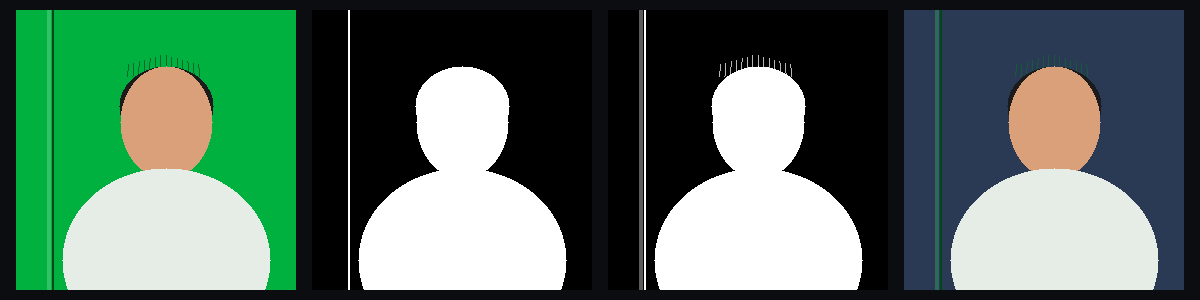
The blur row is worth numbers, because “just soften it” is the usual advice. Blurring the whole frame in post at radius 2 px drops the crease from 25.50% to a peak of 10.39%, which is under the 22% tolerance, so the crease goes to alpha 0. It also mixes the backdrop into the subject edge: in the same 280×280 frame, the count of visibly green pixels within 8 px of the subject goes from 0 to 202. At radius 4 it is 361, at radius 6 it is 576, while the crease peak falls to 5.84% and 4.49%. The crease is gone after one step; the halo keeps growing.
| Blur radius | Crease peak distance | Crease alpha | Green fringe px | Soft band px | Strands kept |
|---|---|---|---|---|---|
| 0 px | 25.50% | 255 | 0 | 0 | 0 / 159 |
| 2 px | 10.39% | 0 | 202 | 97 | 0 / 159 |
| 4 px | 5.84% | 0 | 361 | 290 | 3 / 159 |
| 6 px | 4.49% | 0 | 576 | 342 | 4 / 159 |
Optical defocus is not the same measurement. If the screen is out of focus and the subject is in focus, the crease softens while the subject edge stays sharp, so the fringe cost above does not apply. That is why the shoot-time version sits higher on the ladder than the post version even though both “blur the backdrop”.
The matte repair is the last resort. Take the minimum alpha in a horizontal window around each pixel: a 2 px crease is cleared at radius 1, because the window reaches the transparent backdrop on both sides. The same window eats 1 px off every silhouette and deletes any strand 2 px wide or thinner. At radius 2 it clears lines up to 4 px and deletes strands up to 4 px. There is no radius that clears a crease and spares the hair, because both are thin opaque islands in a transparent field — the geometry is the same, so any operator that removes one removes the other.
| Radius | Widest cleared line | 2 px crease | 1 px strand | 2 px strand | 4 px strand | Erosion |
|---|---|---|---|---|---|---|
| 1 px | 2 px | cleared | deleted | deleted | kept | 1 px |
| 2 px | 4 px | cleared | deleted | deleted | deleted | 2 px |
| 3 px | 6 px | cleared | deleted | deleted | deleted | 3 px |
| 4 px | 8 px | cleared | deleted | deleted | deleted | 4 px |
Questions that come up on a real shoot
Do I really need to iron a green screen?
If the fold is darker than 28% you do, because that is where a 12% tolerance starts to leave it solid; at the 22% default the line is 51.63%. Steam from the back of the fabric rather than pressing the front, and put the fabric under tension on a frame. Hanging cloth from two hooks with a line between them — a real setup question people ask — gives you a catenary sag across the whole width and a fold at every hook, so the crease is not one line but a family of them. A stand with a crossbar and clamps is the cheap fix that removes the problem instead of keying around it.
Why does the leftover look like a scratch instead of a shadow?
Because you are seeing half the fold. The sheen side moves 1.743× faster per unit of change, so at 22%/3% a 20% sheen is already alpha 0 while a 60% crease is still alpha 255. The transparent side and the opaque side meet along the fold line, which gives the leftover two hard edges a few pixels apart. A real shadow has a penumbra on both sides; this has a cut edge on one side and a solid edge on the other, which is exactly what a scratch looks like.
Can I just raise the tolerance until the crease goes?
You can, and it will cost you the hair. A 60% crease needs at least 25.50% tolerance to reach alpha 0; a 48.3%-covered strand sits at 17.12% and is long gone by then. The reverse is also true: at 12% the strands survive and the crease is solid. The only setting where both are acceptable does not exist on this keyer, which is why the ladder above starts with the fabric rather than the slider.
Does a brighter light on the screen flatten the folds?
It flattens the self-shadow, not the geometry. Two lights placed either side of the camera raise the ambient level inside the fold, so the darkened fraction f falls and the crease distance falls with it. The sheen gets brighter at the same time, but the sheen keys out early anyway, so a brighter, flatter screen is a net win. What does not help is moving the light closer to the fabric: that creates a hotspot, which is an additive white patch on the backdrop and keys out sooner than the rest, leaving a hole in the matte where the backdrop should be opaque right up to the subject edge.
Should I open the aperture to blur the backdrop?
Blurring the backdrop in camera does hide fine creases, but it also blurs the screen–subject edge, and that is the edge the key sits on. Measured at 3840 px, a 50 mm lens at f/1.8 focused on a screen 4.5 m away puts 16.6 px of defocus on a subject at 3 m: the crease softens, the silhouette should too, and the matte grows a green fringe. Stop down to f/8, where the blur is 3.7 px, and the crease comes back. The full arithmetic, including why 85 mm needs f/21.8 for a 4 px blur, is on the f-stop page.
Can the browser tool remove the crease for me?
No. The keyer changes alpha from colour distance; it has no clone, heal, mask layer, matte filter or video input. It can show you the crease in the checkerboard, and it can export the alpha so you can inspect it, but the repair itself happens in an editor or a compositor. Saying otherwise would be the same mistake as pretending the tool reads MP4.
What changes for video?
A static crease is in the same place every frame, so one repair holds for the whole shot — unlike a flickering hair edge, which changes frame to frame. The problem moves to the subject: a zone matte drawn over the crease also raises the tolerance wherever the subject crosses that zone, so a hand or shoulder passing the fold loses its edge. If the camera moves, the crease moves with the frame and the zone has to be tracked. The browser tool does not read video at all; see the video path for the frame-sequence route.
Next step
Open the green screen remover on one frame and look for a solid line in the checkerboard before you touch the tolerance. If the problem is the backdrop drifting from lit to shadow rather than a fold, read the uneven-backdrop page; if the leftover is a soft patch with a penumbra, it is a cast shadow, not a crease. For the starting values by material, use the measured tolerance table.