Short answer: there is no single official "Seedance 2.5 free trial" button that works the same way everywhere. What exists are three separate layers, and only one of them is guaranteed to stay free: setting up the job yourself (free here, no account, no card), whatever trial or signup credits the host that runs the model currently offers, and the render limits that host attaches to those credits. This page covers what is free, what is not, and the seven checks to run before you spend anything.
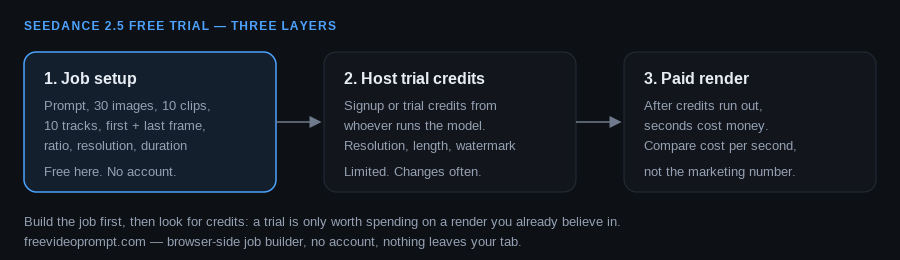
What is free, and who decides it
| Part of the job | Free? | Who decides |
|---|---|---|
| Writing and structuring the job — prompt, reference images, first and last frame, ratio, resolution, duration, sound | Yes, always | It runs in your own browser on this site. No account, no card, no ads, nothing uploaded. |
| Previewing framing before a render | Yes, always | Same page. The preview frame is drawn locally from your first and last frame. It is not an AI render. |
| The actual video render | Only if the host says so | Whoever runs the model: trial credits, signup offers, daily caps, region limits. These change without notice. |
| Watermark, resolution ceiling, clip length on a free tier | Set by the host | Usually the free tier is the one with the watermark and the shorter clip. Read the host's pricing page the day you use it. |
The honest split: the setup step is free and will stay free. The render step is free only as long as someone else's promotion says it is, and promotions move. Anyone promising you a permanent free render of a closed model is describing a promotion, not a product.
The three free layers explained
- Layer 1 — the job itself. A Seedance 2.5 job is a text prompt plus a set of references plus framing settings. Building it costs nothing and needs no sign-in. That is the layer this site handles: one screen, up to 30 reference images, 10 video clips and 10 audio tracks, one first frame, one last frame, six ratios, three durations of resolution, 4 to 30 seconds of length, then copy the prompt or download the job as .txt and .json.
- Layer 2 — host credits. Platforms that run the model sometimes hand out trial or signup credits. Treat them as a one-time sample: they usually come with a resolution ceiling, a shorter maximum clip length, and a watermark. They are useful for one serious test, not for production work.
- Layer 3 — the paid render. After the credits run out, seconds cost money. If you reach this layer with a half-tested prompt, you wasted the trial. If you reach it with a job that already survived a dry run, you buy seconds you can use.
What a free trial cannot tell you
- It cannot tell you whether the model handles your reference set — trials are usually too short to test more than one configuration.
- It cannot tell you the real cost per second, because trial credits are not priced the same as purchased credits.
- It cannot tell you what happens when a prompt is rejected for content reasons. Test that on a throwaway prompt, not on your only credit.
- It cannot tell you whether the free tier supports the resolution and duration you actually need. Check the ceiling before you plan a shot around it.
Seven checks before you spend a trial credit
- Write the whole job first. Prompt, references, first and last frame, ratio, resolution, duration, sound — all of it decided before you touch a credit.
- Read the prompt back and count the subjects. More characters and products competing in one clip is the most common reason a first render disappoints.
- Confirm the caps against what you uploaded: 30 images, 10 clips, 10 tracks, video and audio capped at 30 seconds each on this builder. If the host allows fewer, trim before you paste.
- Check the free tier's ceiling on the host's pricing page on the day you render: resolution, clip length, watermark, region. Screenshot it — these pages change.
- Do one throwaway render with a safe, simple prompt to learn where the output lands, how long it takes and what the download looks like.
- Do the real render with the job you built in step 1. One variable at a time from there.
- Convert what you got into cost per second using the formula below, then decide whether the paid tier is worth it.
Turn a trial into a number: cost per second
Trial credits are not comparable to purchased credits, so compare seconds instead. Fill this in from the host's own pricing page — it is division, not a guess:
seconds per credit = trial_credits / (cost_of_one_credit_in_money)
seconds per credit is not what you want.

what you want:
seconds_per_dollar = credits_per_dollar / seconds_per_credit_cost

practical version:
1. take the paid pack: C credits for P money
2. take the render: D seconds at resolution R
3. seconds_per_dollar = (C / credits_consumed_by_that_render) / P

if the free tier caps you at a lower resolution than you plan to ship,
run the same sum twice — once at the free resolution, once at the paid one —
and compare the two numbers, not the marketing one.
If the two numbers are far apart, the free tier is testing a different product than the one you would buy.
Seedance 2.5 free trial FAQ
Is there a real Seedance 2.5 free trial?
There is no single trial that every platform offers. What you get instead are signup or trial credits from whoever runs the model, plus the free job setup on this page. Check the host's pricing page on the day you use it, because these offers change often.
Do I need a credit card to try Seedance 2.5 for free?
Not for the setup step — this page has no account, no sign-in and no payment of any kind. Whether a host asks for a card before handing you trial credits is that host's decision, so read the signup screen before you type anything.
Is the free path different from the paid path in output quality?
Usually the free tier is capped on resolution, clip length and watermark. That means the clip you get for free may not be the clip you would ship. Run the cost-per-second sum for both tiers before you plan a shot around a free result.
Can I use Seedance 2.5 free on my phone?
The setup step, yes. This page is built for narrow screens with touch-sized controls and no horizontal scrolling, so you can build the whole job on a phone. Rendering still happens wherever the model runs, on that host's terms.
What exactly is free on this page?
The builder: prompt, up to 30 reference images, 10 video clips, 10 audio tracks, first frame, last frame, ratio, resolution, duration and sound, then copy the prompt or download the job as .txt or .json. No account, no ads, no upload — nothing you type or attach leaves the tab.
Does this page render the video?
No. No AI video is rendered here. The preview frame is drawn in your browser from your own first and last frame so you can check framing before spending a credit. The finished job is exported and pasted wherever you run the model.
Where do I see what the render actually costs?
On the pricing page of the host you render with, today. Take the credit pack price, the credits one render consumes, and the clip length it buys, then divide. The formula above does it in one pass, and it works on any host that publishes both numbers.
Where can I try Seedance 2.5 for free?
Two places, in order. Start on this page: the job builder is free, needs no account, and lets you write the prompt, attach up to 30 reference images, lock the first and last frame, set ratio, resolution and duration, then export the whole job. Then take that export to whichever host is currently handing out signup or trial credits — the amount changes often, so read the pricing page on the day you use it, not a screenshot someone posted last month.
I want to use Seedance 2.5 for free with multiple accounts — where do I get that?
You cannot do it legitimately, and this page will not help you route around a host's rules. Trial credits are tied to one account under that host's terms, and stacking accounts to harvest them is exactly what those terms forbid — when it is caught, the credits and sometimes the accounts go with it. What you really want — unlimited free attempts with no account — already exists for the part of the work that is repeatable: this builder. The prompt, the reference set, the first and last frame, the settings, the export: unlimited, no login, no card, no counter. Spend your one legitimate trial on a job you have already rebuilt here five times, and the free attempts stop being the scarce thing.
Does Seedance 2.5 have restrictions?
Yes, but they sit in three different places, and only one of them is about money. First, the job shape: this builder hard-codes what a job may contain — 30 reference images, 10 clips, 10 audio tracks, each media pool capped at 30 seconds, a 4,000-character prompt field and a 4–30 second duration range on 2.5 — and those limits are the same whether you ever pay anyone, because they describe the job you can describe, not the render that follows. Second, the render path: trial credits, watermarks, daily caps and available resolutions belong to whichever host runs the model, and they differ between hosts and change over time, so read that host's pricing page on the day you use it. Third, the model itself: content restrictions apply identically on a free path and a paid one, so a refused prompt is not a symptom of being on the free tier. Work out which layer your restriction came from before you change anything — only the second one is solved by paying.
Is Seedance 2.5 free for 7 days?
Not here — this page has no clock. No account, no trial window, no expiry date, so nothing changes on day seven: the builder you can open today is the same builder in a year. The "free for 7 days" idea belongs to hosts that hand out time-boxed signup credits, and that window is theirs to start, shorten or withdraw, so check their pricing page on the day you use it rather than trusting a screenshot. Build and re-build the job here for as long as you like; only the render ever runs on someone else's timer.
Is Seedance 2.5 unlimited?
The half you are on right now is; the half that renders never is. This builder has no account, no counter and no cooldown, so you can rebuild and re-export the same job ten times or a hundred — nothing throttles it and nothing accrues. The render is a different story on every host: seconds are metered, credits deplete, and "unlimited" offers that appear in search suggestions belong to specific platforms with specific fine print — read that platform's terms on the day you use it, because unlimited claims are the first thing hosts revise. The practical split: treat the setup as unlimited, and treat every render as costing exactly what its host says it costs today.
Does it matter which country I run this from?
For the free half, no — and that is checkable rather than promised. The builder has no country field, no region selector and no geolocation call anywhere in the page's code, so a job built in India, the US or anywhere else comes out byte-for-byte identical: same 4,000-character prompt field, same reference caps, same export files. What can differ by country is only the second half — the render host. Availability, pricing, payment methods and signup offers are set per host and sometimes per region, so the country question belongs on that host's pricing page, not here. Build the job first; geography only enters when you go looking for seconds to spend.
Is there a Seedance 2.5 free APK?
Not from this site, and that is the whole design: there is nothing here to install. This page is a browser-side job builder — open the URL, build the job, export the .txt or .json, close the tab. No download, no package, no sideloading, and the builder works the same at phone width in a normal browser tab, which is what the phone FAQ on this page covers. Be careful with any "Seedance 2.5 APK" you find elsewhere: this builder never ships an app, and a third-party installer that claims to carry the model is a claim about someone else's product — check who publishes it, what it asks for, and whether their site even names a host with published pricing before you install anything. The free path that exists is the one on this page: a URL, a job sheet, and no permissions.
How do I know a Seedance 2.5 site is legitimate?
Read the page, not the promise: a legitimate host publishes numbers you can check before paying, and a flashy one publishes adjectives. Five things to verify on the site itself, in this order. One: published math — a credit pack price, what one credit buys in seconds, and at what resolution; if the page shows only "unlimited" or "cheap" with no division, keep walking. Two: the model named exactly — Seedance 2.5 versus a vague "AI video", plus the clip length and resolution it actually offers on the tier you are buying. Three: the free tier's fine print in writing — watermark, resolution cap, expiry and whether a card is demanded before the trial credits appear. Four: a refund path with a named contact and a window you could actually meet. Five: who runs it — an About page, a legal entity and a contact address rather than a mailbox-only footer. Reports circulating in creator communities describe "unlimited" shops that quietly render on a different model and refuse refunds; treat any such claim, positive or negative, as something to confirm on the seller's own pages rather than in a comment thread. And separate the two halves: this site is the setup half — no account, no card, no install, no render — so every trust question about money, credits and outputs belongs on the pricing page of whoever runs your job. Take the job sheet you built here with you: a host that accepts your prompt, your reference list and your settings as written is a host whose fine print you can read before you spend anything.
Does the preview .webm play the whole length of my video?
No — the free preview is fixed at 3 seconds, whatever duration you set. The recording is a local canvas animation: it cross-fades your first frame into your last frame with a slow 4% push, at 30 frames per second, and the duration slider (5 to 30 seconds) changes only the SETTINGS line the renderer receives, not this recording. The still .png is even shorter — it is always frame 0 of that same composite, so with both frames attached it is the first frame, never the last. Both files are free and unlimited because nothing is rendered: they exist so you can check the crop, the pair and the settings strip before a metered run. If the browser cannot record, the .png still downloads and the status line says so. The practical use is the same as the preview on this page: judge framing and the pair here, then spend the trial credits on a render that has already passed the check.
How many files does a free trial actually need from this builder, and how many does it produce?
It produces four, and a trial host needs two of them. The four downloads are seedance-2-5-free-job.txt, seedance-2-5-free-job.json, seedance-2-5-free-frame.png and seedance-2-5-free-preview.webm — all four unlock after one successful Build, with the .webm arriving a beat later because it has to be recorded. What a trial credit gets spent on is the hand-off: paste the prompt from the .txt (or upload the .json if the host takes structured input), then attach the real image, video and audio files named in that sheet — the exports carry names and lengths only, never the media bytes. The .png and the .webm are for you, not for the host: the frame checks the crop and the first/last pair, the 3-second preview checks the composite, and neither is uploaded anywhere. So before you open a trial page, the free half is finished when you are holding a job sheet plus its reference files; everything after that is the host's metered side.
Will I have to burn a pile of renders to get one usable take?
Nobody can promise you a success rate — this page has none to quote, and anyone selling you certainty is guessing. What can be checked before the meter starts is the part most people skip. First, make the job sheet complete: prompt, references, first/last frame if you have them, and the exact ratio, resolution and duration you intend to pay for — a sheet that says 720p cannot silently get billed at 1080p. Second, spend the free files on framing: the .png shows the exact composite frame, the 3-second .webm shows the first-to-last transition, and both are unlimited precisely because nothing renders. Third, change one thing per rerun — if you edit five lines of the prompt between attempts, you learn nothing from the difference and you still pay for both. The trial's job is not to be enough renders; it is to make the first paid render boring, because everything visible about it was already checked for free.
Does it matter if I switch tabs while the 3-second preview records?
Yes — keep the tab in front for those three seconds. The preview recording is driven by the browser's animation-frame loop: the canvas plays the first-to-last cross-fade one frame at a time, and browsers pause animation-frame callbacks in tabs that are hidden in the background. Switch away mid-recording and the timeline stalls with the tab hidden; the file itself is only assembled after the recording stops, so a stalled recording means a stalled wait for the download button. Nothing is lost — the button unlocks when the tab is visible again and the recording finishes, and the page announces it if a recording somehow comes out empty. The .png frame is unaffected by any of this, because it is a still image taken at the moment you click. Practical rule: press Build, watch the status line for the "ready" message, and only then switch away; if you habitually background the tab anyway, re-press Build when you come back — the preview is free and unlimited, exactly like the frame.
Should I iterate at 480p and only pay for one high-resolution keeper render?
That is a real pattern creators report — render the rough cut at the cheapest resolution, edit the prompt each attempt, and spend the final high-resolution render only on the take that survived — and this builder is built to feed it, because the part it makes is free and unlimited while the part you pay for is metered by resolution elsewhere. How the pattern maps onto the sheet: the Resolution chips include 480p under both models, the choice is written into the SETTINGS line of the .txt and the resolution field of the .json, so a 480p draft sheet and a keeper sheet are two different documents — download both before any render, the drafts cost nothing. Two builder facts keep the loop honest. First, in this builder 1080p exists only under the Seedance 2.0 model at 15 seconds or less (the 1080p button is hidden under 2.5 and resets if you switch back), so a "final 1080p render" plan has to be built as a 2.0 sheet — check the model line, not the plan. Second, the free preview and .png do not change with the resolution chip: they are drawn at the canvas's own fixed size, so preview them for framing and pair, not as a sample of 480p versus 1080p output. The economics stay with the host: what a keeper render costs at each resolution is that host's pricing question, read on the day you buy.
A free host quietly dropped Seedance 2.5 — what should I do with the jobs I already built?
Nothing about your jobs breaks when a host changes its model list, because this builder never depended on the host in the first place. Everything it produces is a file on your own machine: a .txt job sheet, a .json job spec, a .png frame and a .webm preview, all downloaded before any host was involved, and the page itself keeps no account and no history. So the recovery is mechanical. Open the .txt and check what it actually specifies — the first line names the model and mode, the REFERENCES section lists every image, clip and track with the probed seconds, the FIRST FRAME and LAST FRAME lines name the two frame files, and the SETTINGS line pins the ratio, resolution, duration and sound. That document is host-neutral by design: it is text, and any other host that runs Seedance 2.5 takes the same prompt, the same filenames and the same settings without a rebuild. The part you do have to redo, honestly: the media files themselves stay on the device you uploaded them from — the sheet carries names and lengths, never the pixels or the audio — so re-attach the same files at the new host, in the same order, and the numbering in the sheet still matches. Treat a host as rented access, and the sheet as the thing you own; then a quiet model removal costs you a re-attachment, not a lost afternoon.
Does generating Seedance 2.5 directly at 1080p give a different result than upscaling a 480p draft?
Not a question this page can settle — it never renders, so it has seen neither output, and anyone quoting a quality difference between the two paths is quoting their own renders, not a number either path publishes. What this builder can settle is the paper half of the test, and one of its facts changes how you should run it. Resolution here is text: the chips write resolution 480p into the SETTINGS line and settings.resolution into the .json, and the free preview and .png do not change with the chip, so you cannot eyeball the difference on this page. But under Seedance 2.5 the builder offers 480p and 720p only — the 1080p chip exists solely with the 2.0 model at 15 seconds or less — which means a sheet reading 1080p in its SETTINGS line also reads Seedance 2.0 on its first line. So if you hand someone "same prompt, one at 480p one at 1080p" from this builder, resolution was not the only variable; check the model line first. The honest test: two sheets, change exactly one line, render both paths at a host that offers them, and compare — and where a host offers a resolution this builder's chip list does not, remember the chip list describes the job you can describe here, not the host's menu: the SETTINGS line is plain text in a file you own, and the sheet's job is to record accurately what you asked that host for. The draft-versus-direct difference itself stays the host model's behaviour; the sheet only proves both runs asked for the same thing.
I need the same shot in three languages — how many jobs do I build?
Three, because one sheet holds one prompt in one language: the PROMPT block is a single text field and the export writes it as typed — there is no translation step anywhere in this builder, and nothing in the file changes language on its own. The mechanics that keep the three sheets comparable: press Build once per language, because the page holds one job at a time and a second Build replaces the output in front of you instead of keeping two prompts side by side; your attachments stay in place between Builds, so the same images, clips and tracks are written into each sheet under the same filenames and only the wording needs retyping; and leave ratio, resolution, duration and sound identical across the three, so the only line that differs between the files is the prompt. The download names are fixed — seedance-2-5-free-job.txt and .json every time — so each export lands in your downloads as "(1)", "(2)" and so on until you rename it, which is why the language belongs in the filename you save. Attachments are named on the sheet rather than embedded in it, so the same three files point at the same three names in all three sheets. The cost of a translated set is therefore three Builds, three exports and three renders, with one variable changed between each.
Trying this out for the first time — what is the least effort way to start?
One job, one sheet, nothing at stake — and the order below is the shortest path this page can honestly offer, because everything here runs in your own browser with nothing to install, no account and no card. First, skip the attachments: a first job needs only a prompt, so open the builder, pick the model (it starts on Seedance 2.5) and type one concrete sentence — a subject, one action, one camera move — and leave the ratio, resolution, duration and sound chips on their defaults, because defaults are what the first render is for. Second, press Build output: that is the gate that turns the page into the job sheet, and it is also the only "commit" the page has — before it, the four download buttons are disabled; after it, the sheet in the output box is complete and yours. Third, take the two files that cost nothing and prove the most: Download .txt is the sheet itself (prompt, references with probed seconds, the frame lines, the settings line), and the .png is the composed first frame — together they let you re-read exactly what you asked for, which is the whole discipline this builder exists to support. What to skip on day one: the frame pair and the reference pools — they matter for continuity and consistency, but each adds a decision, and the point of the first pass is to see the full loop (prompt → Build → sheet → files in your downloads) end once. What this page will not promise: it never renders, so the first render happens wherever you run the sheet, and whether the output is good is the model's verdict, not this page's. When the first sheet comes back, the natural next questions — how long the render takes, what the trial credits actually buy, what to do when a host drops the model — each have their own answer further up this page; read them with the sheet in front of you, not before you have one.
I use a screen reader — how do I hear which ratio or sound chip is selected?
Honestly: not from the chip itself. The ratio, resolution, sound and mode choices are plain buttons with a visual highlight, and that highlight is the only state they carry — a screen reader will announce the button’s label, but not whether it is the active one. The model picker is the exception: it is a real drop-down, so its current value is announced the way any form field is. Two places do report state as text you can hear: the counters next to each upload (0/30, 0/10) and, above all, the output box after Build — the sheet spells out every choice in words ("ratio 16:9 · resolution 720p · duration 10s · sound on"), and that same text is what Copy and Download .txt hand over. The reliable order for a screen-reader run is: set everything by label, press Build, then read the output box back to confirm the job is what you meant.
Do I need an internet connection to build a job here?
Not after the page has loaded once — the builder itself makes no network call at all. Its own source states the rule at the top (no fetch, no storage), and there is no fetch, XHR or beacon anywhere in the file: your uploads become local object URLs inside the tab, the sheet is assembled in memory from what is on screen, and the four downloads are produced by the browser itself (a text blob, a JSON blob, a canvas snapshot and a short canvas recording). So the honest split is this: the page needed the network to arrive, and after that the job never leaves the device — you can pull the cable mid-build, press Build, and Copy and Download .txt will still work; nothing about the prompt, the filenames or the settings travels anywhere, because the builder issues no requests of its own (any page-view beacon the host injects is page serving, not job data — it never sees a prompt or a file). The ten-second proof is the same one worth running on any tool that claims to be local: open DevTools → Network, tick Offline, then build and download — if the files still land, the network was never in the path. What still needs a connection: loading the page in the first place, and the render itself, which happens on a host you choose — this builder just hands you the sheet.
How long can Seedance 2.5 videos be?
The slider on this builder answers for the model it ships with: under Seedance 2.5 the duration range is 4 to 30 seconds, so the longest single job you can describe here is 30 seconds and the shortest is 4. The number is visible at all times — the hint next to the slider reads its own min and max back to you (it opens at 10s with the range printed beside it), and the label rewrites itself the moment you drag. Two neighbouring facts keep that range from being confused with its neighbours. Pick Seedance 2.0 instead and the same slider clamps to a 15-second maximum, dropping a selection above 15 the instant the model changes — the range belongs to the model, not to the page, which is why the order of operations is model first, then duration. And the length you choose is one number written in two places on the way out: the SETTINGS line of the .txt prints "duration 20s" (or whatever you set) and the .json carries the same value as settings.durationSeconds, so the sheet that leaves here states its intended length unambiguously for whatever host runs it. What this page cannot do is promise that every host grants the full 30: the builder never renders, so the ceiling after that belongs to the model as exposed by whoever you run it on — if a host offers Seedance 2.5 only in shorter cuts, the sheet will still say 30s and that host decides what happens next. One more number that does not scale with your choice: the reference pools stay at 30 seconds of clips and 30 seconds of audio per sheet whether the output is 4 seconds or 30, so a longer video is not a license for longer references. Practical rule: for a first pass, set the length your script actually needs, read the SETTINGS line after Build to confirm it, and treat anything past 30 seconds as a second sheet joined through the first-and-last-frame hand-off described on the first and last frame guide.
Can I use Seedance 2.5 locally — run it on my own machine instead of a host?
Not from this page, and being precise about the two halves keeps the question answerable. What runs locally here is the builder: it loads once and then assembles the sheet, draws the preview and produces the four downloads entirely inside your browser — no fetch, no storage, no upload, and the offline check further up this same page (DevTools → Network → Offline) proves it. What never runs locally is the render: nothing in this site's code contains model weights, a GPU path or any request to a compute endpoint, because this page's whole design is to stop before that step and hand you a .txt and a .json instead. So "local Seedance" splits into claims you must date and source rather than assume. If some installer, repo or download promises the model itself running on your own hardware, that is a third-party claim about someone else's product — verify it the way the APK answer on this page says to: who publishes it, what it asks for, and whether their own pages state what hardware it needs and which model version it carries; this site cannot confirm or sell you any such option, and it never will, because the account, install and hardware questions are all outside what a prompt builder should be trusted to answer. The free path that does exist is the one above: build the job in your browser for nothing, then choose a host for the render and take the sheet there. Practical rule: local for the setup, a named host for the render — and if a "runs locally" claim cannot answer who made it and what it needs, treat the claim, not the sheet, as the thing that failed.
Can I drive the whole builder from the keyboard?
Yes — every control on the page is a native element, so tab order and activation come from the browser rather than from custom scripting. Control by control: the chips (mode, ratio, resolution, sound) are buttons, so they take focus, show the accent focus ring the stylesheet defines, and activate on Enter or Space like any button; the model picker is a standard select whose arrow keys walk its two options; the duration slider is a standard range input with a one-second step, so Left/Right arrows move one second at a time and Home/End jump to the ends of the range the current model allows; the prompt box is a plain textarea where Enter inserts a newline — there is no keyboard shortcut for Build anywhere in the page's script, so the keyboard route to a build is Tab to the Build output button and press Enter; the upload areas are labels wrapping hidden file inputs, and tabbing into the input outlines the whole dropzone, so the focus ring shows you where you are before you open the picker; the remove × on each thumbnail and list row is a real button and takes focus like one; and the four downloads are buttons too, though while they are disabled they are skipped by Tab entirely — they join the tab order only once Build has unlocked them. The FAQ disclosures are native details/summary pairs: Tab to a question, Enter or Space opens it. One honest gap: a chip's selected state is visual only — the blue fill and halo — so a screen reader will not read "selected" back to you; the counters and the built output box are the machine-readable record of what you chose. Practical rule: Tab through the page once before you type anything; if focus never lands on a control you expected to reach, it is either disabled by current state or drawn by script that is not running.
I use a screen reader — when I press Build once, does it announce twice?
Twice, from two different elements, and it helps to know the order. The Output panel holds two live regions, both polite so neither one interrupts you: the status line (role="status", the short sentence under the buttons) and the output box (aria-live="polite", the whole sheet), with the status line sitting first in the page order. One press of Build writes the output box and then the status line — the same click, two writes — so what you hear is the short line first ("Output built. Copy it, download it, or grab the preview frame.") followed immediately by the entire sheet. The sheet is read once, not twice: the status line never repeats it and the box never repeats the status line, so there is no loop to talk over. What changes after that first press is the count per action: pressing a chip or dragging the slider rewrites only the output box, so from then on each press produces a single announcement — the whole sheet again, which is the behaviour the workflow page's live-region question explains and gives a workaround for — while Copy speaks only through the status line ("Prompt copied to the clipboard.") and leaves the box untouched. Practical rule: take the status line as the "it worked" signal, then let the sheet read back as your proof-read, because it is character-for-character what the .txt export contains; and if two utterances on one press are more than you want, finish picking your settings first and press Build last, which is the order this page recommends anyway.
I downloaded a .txt and .json yesterday — can I load them back into the builder and keep editing?
No, and it is worth knowing why rather than hunting for a hidden button: this page has no import path at all. The only file choosers on it accept images, video and audio — frames, clips, tracks — and the script contains no JSON.parse, no FileReader, no readAsText, no fetch and no storage of any kind, so nothing on the page ever reads a text file back in. The exports are deliberately one-way: Build assembles the sheet in memory from what is on screen, Download .txt and Download .json wrap that text in a blob and hand it to the browser's download machinery, and once the tab closes there is no history left to reopen — this page keeps no prompt, no uploads and no previous jobs. So treat the sheet as a hand-off document rather than a save file. To pick yesterday's job back up: open the .txt, paste its PROMPT block into the box, read the SETTINGS line and set model, mode, ratio, resolution, duration and sound to match, then re-attach the files named under REFERENCES — the sheet carries their names and lengths, never their bytes, so they have to come from the device they were on. The .json is the same content in structured form, written for whoever runs the job, not for this page. Practical rule: the .txt is your record of what you asked for, not a resume point — rebuilding from it takes a paste and four chips, and that is the whole recovery.
Is there a prompt guide PDF I can download here?
No - this site ships no PDF anywhere: every page is HTML, and the only files this builder ever produces are the four Build outputs, the .txt job sheet, the .json spec, the .png preview frame and the .webm preview, none of which is a guide. What exists instead is all on screen: the guides index is an HTML directory of the guide pages, the answers on this page are native <details> you can open without an account, and the prompt box itself is the 4,000-character field those guides refer to. Whether other sites hand out a PDF guide is their business - nothing here links to one, and this page will not pretend to a download it never built. Practical rule: if you want paper, use your browser's print-to-PDF on the page you are reading; that copy is yours, but it stops updating the moment the guides change, so keep the URL, not just the file.
I attached ten audio tracks — why does the preview .webm come out silent?
Because the preview recording is video-only by construction, and sound on this builder is a word, not a signal. The preview is captured straight off the drawing canvas: renderWebm() takes el.canvas.captureStream(30) and hands it to a MediaRecorder whose codec list is video/webm;codecs=vp9, video/webm;codecs=vp8 and video/webm (app.js:482-501) — no audio track is ever added to that stream, and the only reason an audio element exists on the page at all is to read a file's duration for the list, never to play it into the recording, so the file that comes out is silent even with all ten tracks attached and the sound chip set to On. Your tracks are not lost, they are just carried as data: each one appears in the .txt REFERENCES list as audio 1 · name · 4.2s (app.js:271-273) and in the .json as a name with measured seconds (app.js:292), while the sound chip only writes sound on or sound off into the SETTINGS line (app.js:279) — an instruction for whoever renders, not a control this page can exercise. The local preview's job is framing: it draws your first and last frame and the settings bars, and it tells you so in the caption under the canvas. Practical rule: listen to audio in the files you attached, using your own player, and judge the sound only after the host renders — the .webm here answers "is the framing right", never "is the sound right".
My render got stuck at 99% — can anything on this free page hang like that?
No, and the reason is structural: there is nothing here that can reach 99% of anything. This page has no queue, no job in flight and no progress value of any kind — the status line is plain text written by one function (app.js:53-56) and the words it prints are sentences like "Output built." or "Downloaded the job as .txt", never a number that could climb. The script keeps no network path at all: its own header comment says "No fetch, no storage" (app.js:9), and the file contains no fetch, no XMLHttpRequest and no beacon — uploads are read as local blob URLs (app.js:118-136) and downloads are built synchronously from a Blob and handed to a link (app.js:402-410). The only timed things on the page are the three-second preview recording plus its 180-millisecond tail (app.js:518-524) and the four-second cleanup of a spent download URL (app.js:409); both run on your machine and both finish on their own. So a render sitting at 99% is entirely on the host that is rendering: this site neither reports that state, nor retries it, nor can it — it never sent the request. What is safe while you wait: your sheet already exists as local files, nothing here stores or queues jobs, so a hang cannot cost you the job you built — the .txt and .json are on your disk and can be re-sent whenever the host comes back. Practical rule: treat the stuck percentage as the host's line to fix, and use the wait to re-read the SETTINGS line so the resend is the job you actually meant.
Can anyone recommend a website that offers a free trial of Seedance 2.5?
Start with what you can settle without one: the trial you can take today is on this page, and it is the setup half — no account, no card, no watermark, no render. The question as asked wants a host that will render a character-replacement test for free, and that answer belongs to whoever is granting credits this month, not to a builder: free quotas, daily caps and card requirements live on each host's own pricing page and change without notice, so any list you read (including this one) is stale the day it is written. What you can do before you go looking: build the exact test you intend to run, so the trial credit is spent on a job you already believe in. A 15-second character-replacement test fits this builder as it stands — 15s sits inside the 4–30 second range, Image to Video takes your starting frame in the First frame slot, and the character, outfit and scene references go into the 30-image pool so the sheet names each one for whoever renders it (app.js:263-267). The prompt travels verbatim, so the wording you want to test is the wording that leaves. What this page cannot do is run the replacement, grade the result or tell you which host is currently free — it never sends the job. Practical rule: ask a host two questions before you sign up — how many credits the trial gives and what one credit buys in seconds — then take the sheet you built here and check that it accepts your prompt, your reference list and your settings as written.
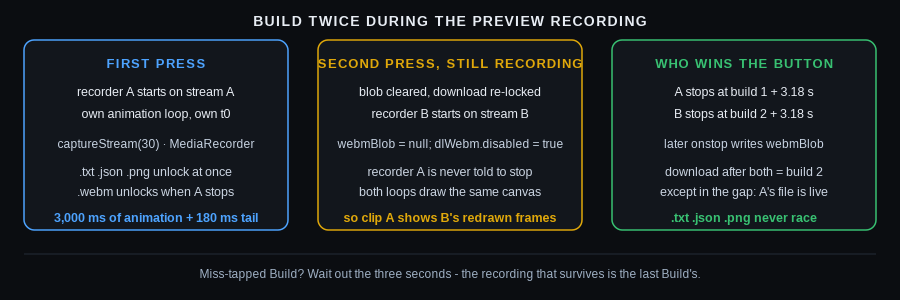
I pressed Build twice while the preview was still recording — which .webm do I end up with?
The second one, once both recordings have finished — but the window in between is real and worth understanding. Each Build calls renderWebm() (app.js:414-433), and every call starts by throwing away the previous result: webmBlob = null and el.dlWebm.disabled = true (app.js:492-493), so the download button locks again the instant you press Build a second time. The new call then takes its own stream off the same canvas (el.canvas.captureStream(30), app.js:499) and starts its own recorder (app.js:501) — the first recorder is never told to stop, so both keep recording the one canvas, each on its own requestAnimationFrame loop with its own start time (app.js:518-526). Consequence 1: while the two overlap, the first recording is being drawn over by the second loop's animation, so clip one does not show a clean copy of its own take. Consequence 2: each recorder stops 3,000 ms of animation plus a 180 ms tail after its own Build (app.js:518-524), so recorder one stops at build-one + 3.18 s and recorder two at build-two + 3.18 s; whichever stops last writes webmBlob last (app.js:508-515), and since the second build is later, its recorder is the one that finishes last. Consequence 3: in the gap between those two stops, the first recorder's onstop briefly re-enables the button with its own file in place — a download taken in that gap hands you the first recording, and the status line says "ready" before the second one is done. Practical rule: if you press Build again by accident, wait out the roughly three seconds before touching Download preview .webm — the file that survives is the last Build's, and the .txt, .json and frame .png are unaffected by the race because they are regenerated from state on click, not recorded (app.js:457-474).
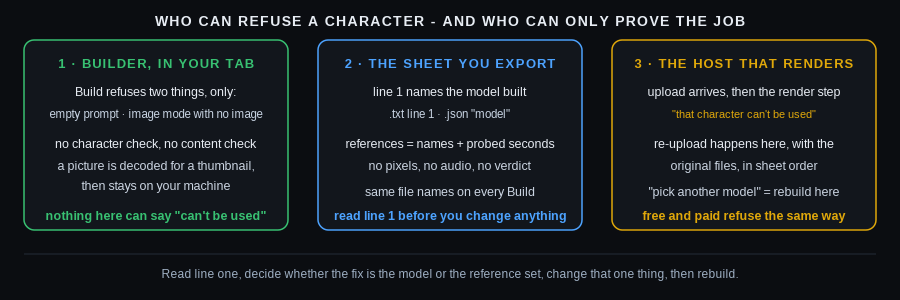
My host refused the job with "That character can't be used on this model. Re-upload it, or pick another model." — what can I check on this free page?
Three things, and it is worth knowing which layer each one belongs to. First, where the message came from: not from here. This builder has no character check, no content check and no model call anywhere in it — the only two things Build ever refuses are an empty prompt and, in Image to Video, a job with neither a first frame nor a reference image (app.js:416-423) — and the only thing it does to an attached picture is decode it to draw a thumbnail (app.js:118-124). Your files are read inside your own tab and never sent, so a "character can't be used" verdict can only be produced after the host receives the upload, at the render step. Second, the half you can check here: which model your job was actually built for. The first line of the .txt prints it ("Seedance 2.5 · Image to Video", app.js:257) and the .json carries the matching model field (app.js:286) — so before you change anything, open the sheet and read that line, because "pick another model" is not an edit you make to an existing file: switching the dropdown here changes the form itself (under 2.0 the duration ceiling drops to 15 seconds and 1080p appears; back on 2.5 the ceiling returns to 30 and 1080p is hidden again, app.js:92-106), which means a new Build and new downloads. Those downloads keep the same fixed file names, so the browser will save them as "(1)", "(2)" — tell the two sheets apart by their first line, never by the file name. Third, the "re-upload" half: the sheet never contains your media, only each file's name and probed seconds (app.js:289-293), so the re-upload happens at the host with your original files, attached in the order the REFERENCES block lists them. For the rule that ties the layers together, the restrictions answer above still holds: content rules apply identically on a free path and a paid one, so this refusal is not a symptom of the tier you are on. Practical rule: read line one of your sheet, decide whether the fix is the model or the reference set, change that one thing, and rebuild — one variable per attempt, exactly as everywhere else on this site.
Next step
Build the job before you look for credits — that way a trial is spent on a render you already believe in. Open the builder, or read what this site does and does not do.